
Searching Chaffee County Civil Dockets
When you simply need to know whether a civil hearing or return date is set, use the official Chaffee County Docket Search. One non-date filter is required at minimum. An exact case number works best. Pick the four-digit year, the civil class, and the sequence. No number handy? Search a person or business name instead.
Treat what you get as a calendar entry. Before relying on it, confirm the location, class, hearing label, appearance mode, and courtroom. The result holds no pleadings. Ask the clerk's request form for those.
The state interface adds filters for district, courthouse, court type, division, attorney, and attorney bar number. Dates run from six months, three months, one month, one week, today, or a specific date. Twenty results load at a time, with print and export controls. A download can save a setting. It still does not turn the calendar row into an official order or a complete civil docket.
- Identify District Court CV, County Court C, or small claims S from the case number or initiating paper.
- Select Chaffee County and the matching court type.
- Search by exact number, individual name, or business name.
- Copy the matched case number and setting fields.
- Request the ROA, then order any signed filing by its title and date.
Three Chaffee County Civil Docket Tracks
One Chaffee Combined Court clerk keeps all these civil files, but the class letters decide where each matter runs. CV marks the general District Court civil track. C is County Court civil. Small claims use S. Domestic relations and probate sit in separate DR and PR classes, which can carry added access limits.
| Class | Court track | Search point |
|---|---|---|
| CV | District Court general civil | Use District Court and the exact number |
| C | County Court civil | Use County Court and class C |
| S | County Court small claims | Use County Court and class S |
| DR or PR | Domestic relations or probate | Expect document-specific access rules |
A claim does not slide into municipal court just because of a Salida or Buena Vista address. Municipal courts hear local ordinance matters. They do not hear the county's ordinary civil docket.
Chaffee's state courts are unified at the local level. District Court and County Court share the Salida location and the Clerk of Court. Even so, their jurisdiction and class codes stay distinct. The elected Chaffee County Clerk and Recorder is a different office. Its recording, election, vehicle, and licensing work never touches the civil court file.
Inside a Chaffee County Civil Docket
A public calendar result identifies a setting. But it is not the whole civil case record. The Chaffee County Register of Action serves as the chronological case summary. It can index the complaint or petition, responses, and motions. Minute orders, settings, judgment, and later satisfaction events can appear there too. Filed images take a separate request.
| Case number | Year, class, and sequence, such as 2026-CV-00123. |
|---|---|
| Public setting | Date, time, duration, hearing type, and Chaffee location. |
| Appearance | In person, virtual, or blank, plus the listed courtroom. |
| ROA history | Dated filings, settings, minute orders, and recorded rulings. |
| Document file | Pleadings, signed orders, judgments, and available exhibits or attachments. |
The calendar leaves plenty out. It does not show the sum claimed, proof of service, an answer, motion text, the judge, the lawyers, judgment terms, post-judgment writs, or document images.
Chaffee County Monday Civil Dockets
Locally, the court publishes County Civil and District Court Rule 120 return settings for Mondays at 10:00 a.m. That is a helpful Chaffee County schedule marker. It never replaces the notice in a specific case. Holidays, court orders, continuances, or a case-specific direction can each change what applies.
Return date is not trial: A Return Date on Summons is a response or appearance stage. It does not mean evidence will be tried or a final judgment will be entered that day.
Check the latest setting close to the hearing date. If the appearance mode is blank or the event was reset, call the Chaffee Combined Court at 719-539-2561.
Civil Case Types on the Docket
Chaffee County civil court dockets hold more than one kind of dispute. General civil, County Court money cases, and small claims each follow their own track. Domestic relations and probate also generate civil records. Parts of those files may be protected.
| Matter | Likely class | Useful requested record |
|---|---|---|
| General civil claim | CV | ROA and signed order |
| County civil claim | C | ROA and Order for Judgment |
| Small claim | S | ROA and judgment |
| Domestic relations | DR | Decree, parenting plan, or support order |
| Probate | PR | Letters, will, petition, or closing document |
Let the exact case number guide your selection. Never infer the class from a party name or street address.
Choose Chaffee County Civil Records Precisely
The Colorado Record/Document Request Form separates the ROA from civil, family, and probate documents. Civil choices include an Order for Judgment and a Transcript of Judgment. A Satisfaction of Judgment and a Protection Order are civil choices too. Family choices cover a decree, parenting plan, separation agreement, support order, and petition. Probate has its own list. The official form displays those choices. It also shows the identifying fields used to route a Chaffee County civil request.
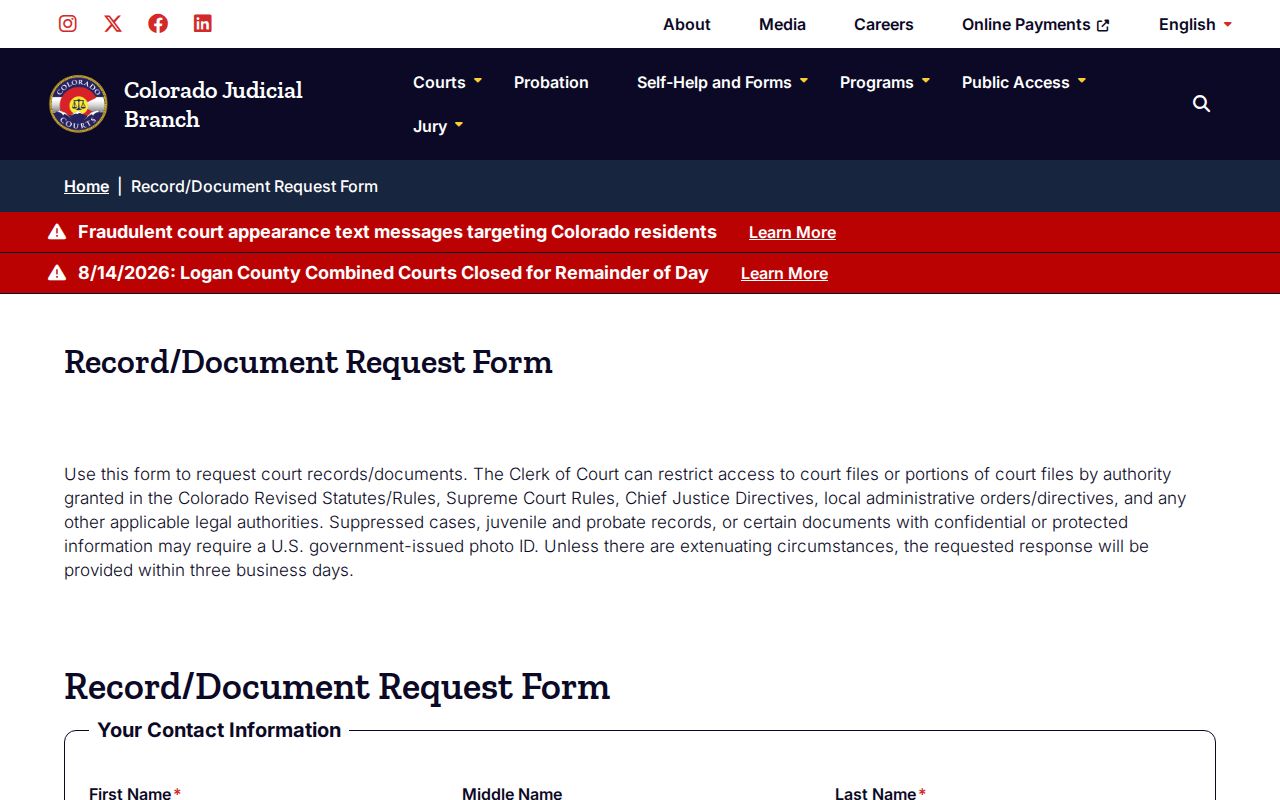
This is why an ROA-first request saves money. It shows the title and date of a filing. You learn that before you pay to copy a broad file.
Give Chaffee County, party names, case number if known, year, and a precise description. Mark certified or exemplified only when clerk authentication is required.
Colorado Courts E-Filing is a separate system. It receives electronic filings from eligible users. An e-filing account still does not put every filed image on the free public calendar. Self-represented users may opt into CCE for their own eligible domestic-relations or eviction matters. Anyone seeking an ROA or a copy should stick with the court-record request route.
Civil Docket Settings and Hearings
The civil calendar in Chaffee County labels each setting with its purpose: Hearing, Return Date on Summons, Show Cause Hearing, motions settings, or a protection-order event. That label is only the plan for the day. It tells you nothing about how the judge ruled. And it is not a document image either.
Watch for continuances. A reset leaves the old event sitting in the ROA. Meanwhile, a newer notice sets the date that actually controls. So read the chronology. Compare the entry and event dates. Then track down the most recent order or notice. The Chaffee County court dates resource has more on appearance modes and setting fields.
- Motion
- A filed request asking the judge to enter an order.
- Minute order
- The court's brief official record of a ruling or event.
- Judgment
- The enforceable determination of civil rights or liability.
- Satisfaction
- A formal record that a judgment has been satisfied.
Chaffee County Civil Judgment Records
Judgment paperwork comes in three distinct forms. An Order for Judgment states what the court ordered. A Transcript of Judgment is a certified judgment record you would use for enforcement or recording. A Certificate of Satisfaction formally shows the judgment has been satisfied. Treat them as separate documents, not interchangeable names.
Copy work is cheap; certification is not. A Transcript of Judgment runs $25, and a Certificate of Satisfaction runs $20. Plain copies cost $0.25 per page, while a certified or exemplified copy is $20 per document plus the copy cost. A name search is $5. Ask the clerk for a quote before anything is produced.
Note: the statewide form targets a response within three business days unless extenuating circumstances require more time.
Civil Docket Access Rules
Plenty of Chaffee County civil docket entries are open to the public. Still, access turns on the record type and case class. Domestic relations, probate, protection-order, juvenile, adoption, and mental-health matters can carry limits. Files with protected data can carry them too, at the categorical or document level. Some suppressed, juvenile, and probate requests may require a U.S. government-issued photo ID. The form's own warning says so.
Chief Justice Directive 05-01 governs access to Colorado court case records. It covers remote access, facility-only records, exclusions, and fees. Administrative records are different; they follow a separate Judicial Branch rule. And a request for a civil ROA or order goes to the Combined Court clerk. It does not go to the elected County Clerk and Recorder.
That split is Chapter 38, Rule 2. It covers Judicial Branch administrative records such as policy or correspondence. It does not replace CJD 05-01 for a case file. Say you want both a court order and a court policy. The order belongs in a case-record request. The policy, meanwhile, takes the administrative-record route. Keeping the two straight saves a round trip with the clerk.
When Chaffee County Civil Search Fails
A blank docket search result has many innocent causes. The date range, spelling, case class, county, or court type may simply be wrong. Or there is genuinely no public setting in the period you chose. Search a business under the business-name option rather than as a person. Older files can sit off site, which means actual retrieval cost before you see anything.
Reach the Chaffee Combined Court clerk at 719-539-2561 or ChaffeeCountyClerk@judicial.state.co.us. The web form works too. An authorized mail or fax route works, as does the counter at 142 Crestone Avenue in Salida. Ask up front about access, identification, prepayment, and retrieval. Transcripts go through a separate transcript request channel.
The location page lists P.O. Box 279, Salida, Colorado 81201, and fax 719-530-7017. Building hours run longer than the clerk counter. Beginning March 1, 2026, the published weekday counter hours are 7:30 a.m. to noon and 12:30 to 4:30 p.m. State holidays are excluded. Confirm the current schedule before going in person. That matters most for an archived file or a document needing certification.
Chaffee Combined Court Clerk
142 Crestone Avenue
P.O. Box 279
Salida, CO 81201
719-539-2561
ChaffeeCountyClerk@judicial.state.co.us