
How to Search Cases by Name
The Chaffee-filtered Judicial Branch Docket Search takes a person's name or a business name. Keep one thing in mind. It returns court settings, not every case tied to a matching party. The date range alone won't carry a search; you need at least one more filter. A careful name search pairs Chaffee County with the correct court type. Add a sensible date span too. Compare the case class and hearing details before trusting any single row as your match.
- Select Chaffee County or Chaffee Combined Court and choose District Court, County Court, or both.
- Choose Individual or Business. Enter first and last name for a person, or use the business-name field.
- Add a date range and, when known, a case class, division, or attorney identifier to narrow common-name results.
- Compare the result's year, class, location, hearing type, and displayed name with a notice or other known fact.
- Copy the complete case number before requesting the ROA or a filed document from the clerk.
| Field label | Type | Required | Chaffee search use |
|---|---|---|---|
| County | Dropdown | Optional | Select Chaffee County when the district or courthouse is not already set. |
| Court Type | Dropdown | Optional | Choose Both, County, or District based on the likely case class. |
| Date Range | Dropdown | Workflow field | Choose six months, three months, one month, one week, today, or a specific date. |
| First and Last Name | Text | Optional route | Available after Individual is selected. |
| Business Name | Text | Optional route | Use for an organization named in the setting. |
Chaffee County Case Lookup Filters
Because the public tool spans every Colorado trial-court location, local filtering does the real work. Judicial District runs from the First through the Twenty-Third. Chaffee County sits in the Eleventh. Courthouse narrows things to Chaffee Combined Court. Division works as a free-text box for a known local courtroom or division identifier. Attorney search accepts a bar number or a first and last name.
Never lean on the date field by itself. That design keeps a statewide calendar pull manageable. Yet it can mislead anyone expecting every filing under a given name. Set Chaffee County plus one identity field first. Then try alternate spellings. Stretch the date span, or hop between County and District Court until the setting you expect turns up.
Best first check: Use the exact case number when available. A name-based Chaffee County case lookup needs more review before a row is treated as the right matter.
How to Search by Case Number
A Colorado trial-court number goes in as three separate pieces. You enter a four-digit year, a case class, and a numeric sequence. The form wants no single hyphenated string. So 2024-CV-00123 becomes year 2024, class CV, and sequence 00123. Copy each part straight from the notice or earlier record.
The case class tells you the docket category. CR usually signals a District Court criminal case, CV a District Court civil case, M a County Court misdemeanor, T a County Court traffic matter, C a County Court civil case, S small claims, DR domestic relations, and PR probate. The selector also offers CW, JD, JV, and R. Is the source document unclear? Never guess the class. Juvenile classes can carry access limits too.
Appeals, transfers, and consolidations can spawn a second number. If the Register of Action points to an originating matter, run both. That complete number serves clerk staff best. It also helps with off-site retrieval, document requests, or checking the current Chaffee County court date.
Chaffee County Case Lookup Pagination
Each page of results holds twenty entries. Paging through further settings leaves your selected Chaffee County case lookup filters untouched. A wide name search may force you past the first page before a likely match shows.
Export Results and Printable Version are convenience tools. They save a view of listed settings. But they aren't court orders and can't freeze the docket. Confirm the live search and the newest court notice before relying on any date, mode, or courtroom.
Chaffee County Case Lookup Gaps
A blank search proves almost nothing on its own. Maybe the chosen date range holds no public hearing. Maybe the name carries another spelling, or the number has the wrong class, year, or court type. A city matter may still sit with a municipal court, and a federal matter never enters the Chaffee Combined Court search at all. Sealed or suppressed cases, along with protected juvenile or probate material, stay out of ordinary results.
Work through the likely causes in order:
- Broaden the date range and verify Chaffee County or the Eleventh Judicial District.
- Switch Court Type between County, District, and Both.
- Recheck spelling and each segment of the case number.
- Read the citation or notice for a city, state, or federal court name.
- Call the Clerk of Court at 719-539-2561 for older, off-site, suppressed, or uncertain files.
Where the official form warns of a restriction, a clerk may ask for identifying details or government-issued photo ID. And never treat a blank result as proof that no case exists.
What a Case Search Shows
What you get from a Chaffee County result is a calendar entry. It tells you when, where, and how a listed event is set. It won't show the full party alignment. Nor will it show the charge statute, pleadings, judgment, financial balance, or document image. Those details live in the ROA. Separate court papers hold them too, subject to access rules.
| Case number | Year, case-class letters, and sequence for the listed Chaffee County matter. |
|---|---|
| Displayed name | A public caption component, not necessarily the complete list of parties. |
| Date and time | The listed start date and time for the event. |
| Duration | The calendar estimate for the scheduled event. |
| Hearing type | The setting label, such as status conference, arraignment, or motions hearing. |
| Location and courtroom | The Chaffee court location plus a numbered or lettered room. |
| Appearance type | In person, virtual, or blank. A blank mode requires clerk confirmation. |
A setting label is not a disposition. A plea and sentencing setting, for instance, proves neither event happened. For the true outcome, request the signed order or disposition record.
Chaffee County Municipal Case Lookup
Municipal cases stay with the city court that issued or received the citation. They never slide into the statewide Chaffee County search. An event happening inside county lines makes no difference. Salida runs its own citation lookup. Buena Vista publishes no official public case-name portal. Poncha Springs offers a payment channel rather than a documented case-history search.
The Salida Municipal Court citation search shows why the issuing court must be checked separately:
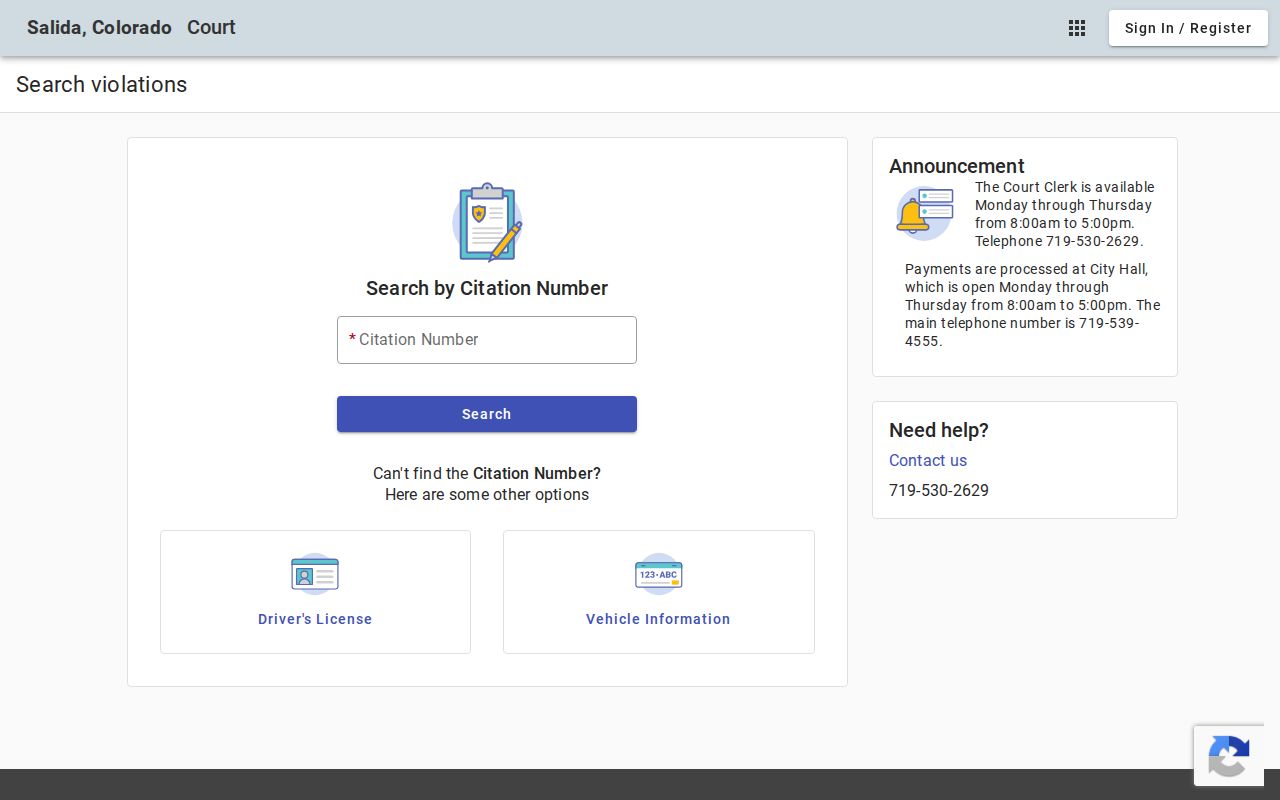
Salida lets you search by citation number, license details, vehicle plate, name with date of birth, or business name. Skip sensitive identifiers unless truly necessary, and use only the official city-authorized route.
Poncha Springs works through a town-authorized Heartland payment application:
Treat this portal as a way to pay, not a way to read. It offers no proof of a public Poncha Springs docket database, since the site never labels its fields for public searching.
County vs Statewide Case Search
Chaffee County runs no separate public portal with full case detail. For case lookup, the free Judicial Branch Docket Search serves as the statewide calendar. Filter it to Chaffee and it becomes the local one too. A deeper statewide Register of Actions search exists through approved commercial providers such as CoCourts. That service charges a fee. It also skips document images. For the ROA itself or named papers, one route is direct. Use the official court form to request it.
| Search route | Coverage | Best use | Key limit |
|---|---|---|---|
| Judicial Branch Docket Search | Statewide trial-court settings, filterable to Chaffee | Finding a public hearing date and courtroom | Not the full ROA or document file |
| Approved ROA provider | Broader statewide Register of Actions access | Name or case-number history search | Fees apply and images are not included |
| Chaffee clerk request | Chaffee Combined Court file | ROA, order, ticket, judgment, or certified copy | Fees, ID, redaction, and access limits may apply |
| Municipal court | One city court | Local-code or municipal traffic case | Channels vary by city |
Colorado Courts E-Filing is not the public Docket Search. It is a filing system for authorized users, and a self-represented person can reach only their own case in supported case types.
Chaffee County Attorney Case Lookup
The free Docket Search has an attorney route too. Pick attorney name or bar number at the search screen. Then type the numeric bar identifier or the attorney's first and last name. This helps when a party name is common. It also helps when the case number is unknown. The search can still surface a public Chaffee County setting.
Treat attorney results like party results. Confirm Chaffee County, District or County Court, case class, year, hearing type, and date. A name appearing in a hearing row shows only that row. It does not show current representation. The filed notice or the case record is the better source for representation status.
Chaffee County Federal Case Search
Federal matters never show up in the Chaffee Combined Court calendar. Chaffee County sits in the United States District Court for the District of Colorado. There, CM/ECF and PACER identify the federal docket. Bankruptcy goes to the United States Bankruptcy Court for the District of Colorado instead.
The PACER Case Locator works as a national index. The specific federal court may hold newer information than that index does. Federal searches require an account. They can also rack up page-based fees. None of that touches the free Colorado trial-court hearing list. The Chaffee County clerk's ROA request stands apart too.
Chaffee County Case Lookup to ROA
With a case number in hand, one form matters. File the official Record/Document Request Form and ask for the Register of Action. Choose Chaffee County, add the year and party names, and describe the record with care. The ROA is a short chronological case summary. It covers charges, sentences, minute orders, and other events. It does not automatically include images of the documents it indexes.
A smart request works in steps. Start with the ROA. Find the entry and date that matter. Then name the pleading, order, judgment, ticket, or decree you need. Check the certified or exemplified option only when authenticated copies are required. The form aims to respond within three business days absent extenuating circumstances. An old off-site file, redaction work, or a restricted matter may stretch that.
Phone and in-person options still count. The Chaffee Combined Court clerk sits at 142 Crestone Avenue, P.O. Box 279, Salida, CO 81201; phone 719-539-2561; email ChaffeeCountyClerk@judicial.state.co.us. Ask before sending private data by email or fax.
Restricted Cases and Access Rules
Chief Justice Directive 05-01 governs public access to Colorado court records. Some records are excluded from public view or open only at a court facility. Sealed and suppressed matters may return no public results at all. Juvenile, adoption, mental-health, sensitive probate, and protected-document categories face limits. Law, rule, directive, or court order can restrict them.
The official request form offers a warning. Suppressed cases, juvenile and probate records, and documents with protected information may demand a United States government-issued photo ID. Give the clerk the exact case number and explain your relationship to the matter. Staff can say what identification, authorization, or order is required. They cannot waive a judge's restriction.
Sealing does not erase the internal court record. It changes how the court answers public access requests. Colorado's framework includes state legislative guidance on sealing and expungement. Eligibility and access turn on the particular case.
Chaffee County Case Lookup Boundaries
The Chaffee Combined Court clerk keeps files at the Salida location. Both District Court and County Court files sit there. District Court handles felonies, larger civil matters, domestic relations, juvenile cases, probate, and other general-jurisdiction work. County Court takes misdemeanors, county traffic, small claims, protection orders, and civil matters within its limit. Municipal clerks hold the city-code cases.
The elected Chaffee County Clerk and Recorder does not keep court files. That office runs recording, elections, motor vehicles, and other county functions. Federal cases sit outside the Chaffee Combined Court system too. Chaffee County lies in the United States District Court for the District of Colorado. Its cases use PACER and CM/ECF.
The practical sequence is short. Identify the court level and choose the case class. Search the free calendar and copy the number. Then request the ROA, and after that a specific paper. That keeps a Chaffee County case lookup pointed right. It aims at the correct clerk and the right kind of record.